
HBase Succinctly®

CHAPTER 8
Inside the Region Server
Cache and Cache Again
Although the Region Server leverages HDFS so that it has a clean interface with the storage layer, there is added complexity to provide optimal performance. The Region Server minimizes the number of interactions with HDFS, and keeps hot data in caches so it can be served without slow disk reads.
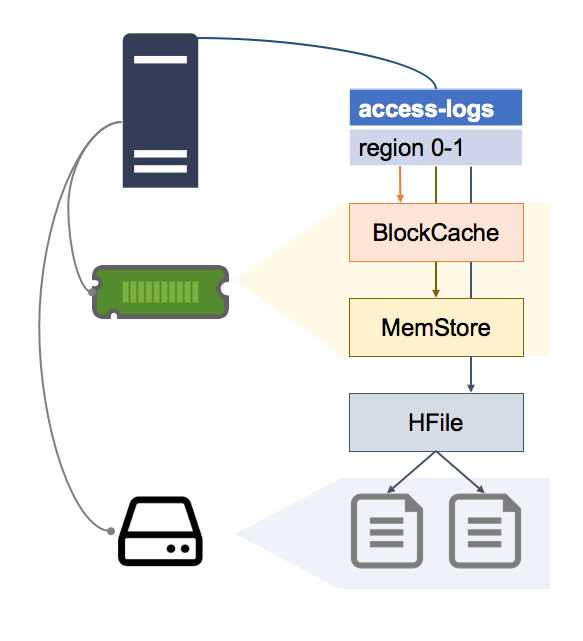
There are two types of caches in each Region Server, shown in Figure 10:
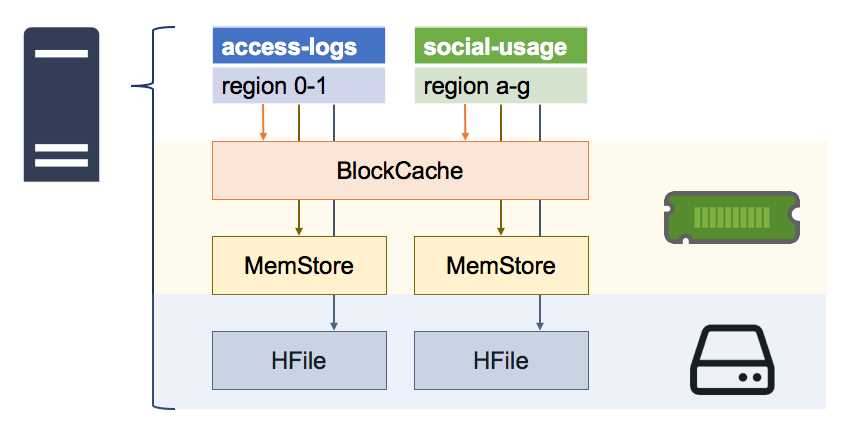
Figure 10: Caches in the Region Server
The BlockCache is a read cache that keeps recently fetched data in memory; the MemStore is a write cache that keeps recently written data in memory; and ultimately, there's the HFile, which contains the data on disk.
It's important to understand how those pieces fit together because they impact performance and will feed back into your table design and performance tuning.
The BlockCache
HBase uses an in-memory cache for data that has recently been fetched. Each Region Server has a single BlockCache, which is shared between all the regions the server is hosting, shown in Figure 11:
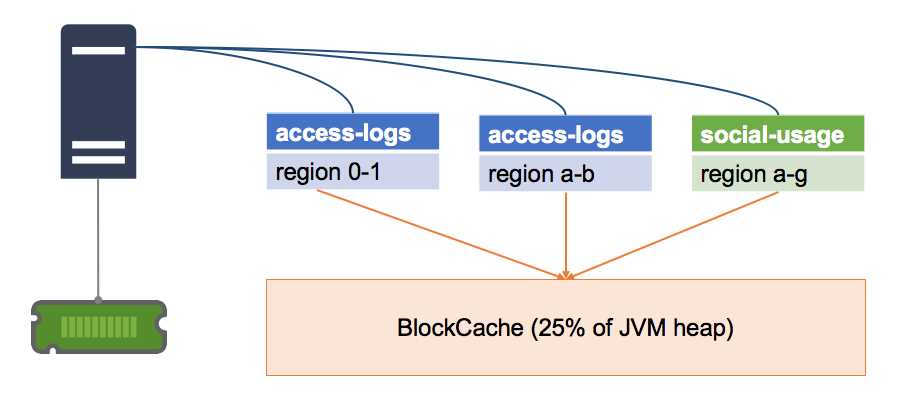
Figure 11: One BlockCache per Server
By default, the memory allocated to the BlockCache is 25 percent of the heap for the Java Virtual Machine. That size is limited by the physical memory in the server, which is one reason why having an excessive number of regions impacts performance—all the regions will compete for a limited amount of memory space.
When the Region Server gets a read request, it checks the BlockCache to see if the data is in memory. If so, it returns and the read will be very fast. If not, then the server checks the MemStore for the region to see if the data has been recently written. If not, then the server reads the data from the relevant HFile on disk.
The BlockCache uses a Least Recently Used eviction policy, so data items which are repeatedly accessed stay in the cache, and those which are infrequently used are automatically removed (although since caching is so critical to high performance, HBase allows you to tune the BlockCache and use different caching policy algorithms).
The MemStore
The MemStore is a separate in-memory cache, for storing recently written data, and a Region Server maintains one MemStore for each region it hosts, as shown in Figure 12:
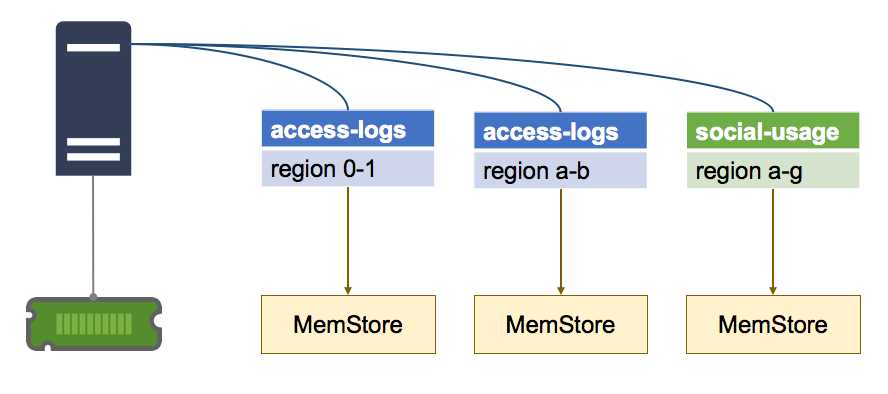
Figure 12: One MemStore per Region
The MemStore serves two purposes—the first is as a cache, so recently written data can be fetched from memory when it gets accessed, which reduces disk reads.
The second, more significant role of the MemStore is as a write buffer. Writes to a region aren't persisted to disk as soon as they're received—they are buffered in the MemStore, and the data in the buffer is flushed to disk once it reaches a configured size.
By default, the write buffer is flushed when it reaches 128MB, as shown in Figure 13:
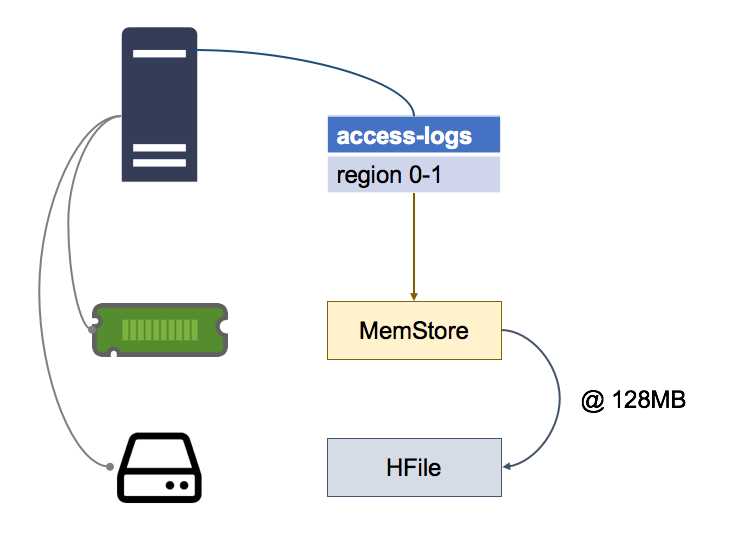
Figure 13: Flushing the MemStore
Data in the MemStore is sorted in memory by row key, so when it does get flushed, HBase just makes a series of fast, sequential reads to HDFS to persist the data, which is already in the correct order.
The data on disk is called an HFile, and logically a single HFile contains all the data for one column family in one region of one table. Because of the MemStore and the buffer-then-flush pattern, HFiles can be composed of many physical files, called Store Files, each containing the data from one MemStore flush.
Having multiple Store Files for a single HFile can affect read performance, as a fetch from a Region Server may require it to read many files on disk, so periodically HBase compacts the Store Files, combining small files into one large one.
You can also manually force a compaction (which we'll cover in Chapter 9 Monitoring and Administering HBase”). After a major compaction, each HFile will be contained in a single Store File on disk, which is the optimum for read performance.
Buffering and the Write Ahead Log
Buffering data as it's written and periodically flushing it to disk optimizes write performance of the Region Server, but it also creates the potential for data loss. Any writes that are buffered in the MemStore will be lost if the Region Server goes down, because they won't have been persisted to disk.
HBase has that scenario covered with the Write Ahead Log (WAL), stored in HDFS as a separate physical file for each region. Data updates are buffered in the MemStore, but the request for the data update gets persisted in the WAL first, so the WAL keeps a log of all the updates that are buffered in the MemStore, as in Figure 14:
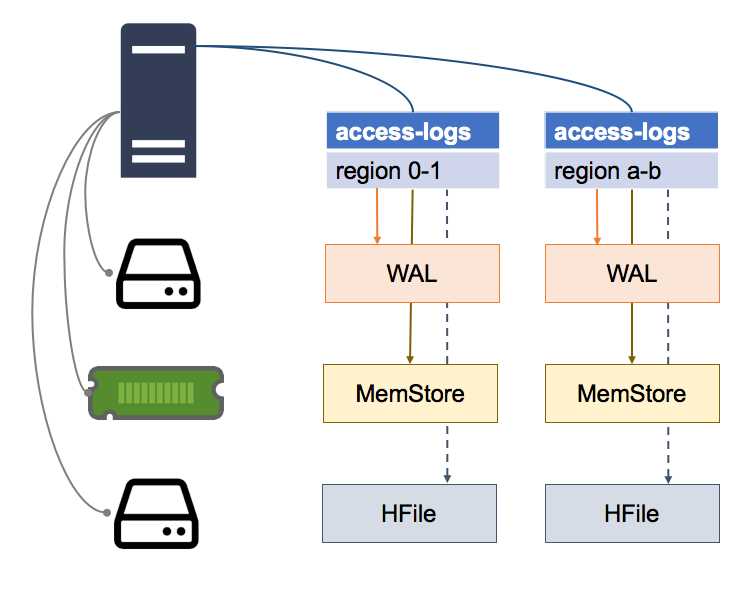
Figure 14: Write-Ahead Log Files
If a Region Server goes down, when the region is allocated to another server it checks the WAL before bringing the region online. If there are updates logged in the WAL, the new Region Server reads them and persists them all to the HFile before making the region available.
Region Servers don't acknowledge a write request until the update is committed to the WAL, and new Region Servers don't accept any requests while a region is being brought online (including flushing the WAL to disk).
In the event of server failure, there will be a period of downtime when data from the regions it hosted is unavailable, but data will not be lost.
HFiles and Store Files
The structure of an HFile is designed to minimize the amount of disk reads the Region Server has to do to fetch data. An HFile only contains the data for one column family in one region, so the Region Server will only access a file if it contains the data it needs.
Data in HFiles is stored in blocks, and sorted by row key. Each HFile contains an index with pointers from row keys to data blocks, as we see in Figure 15:
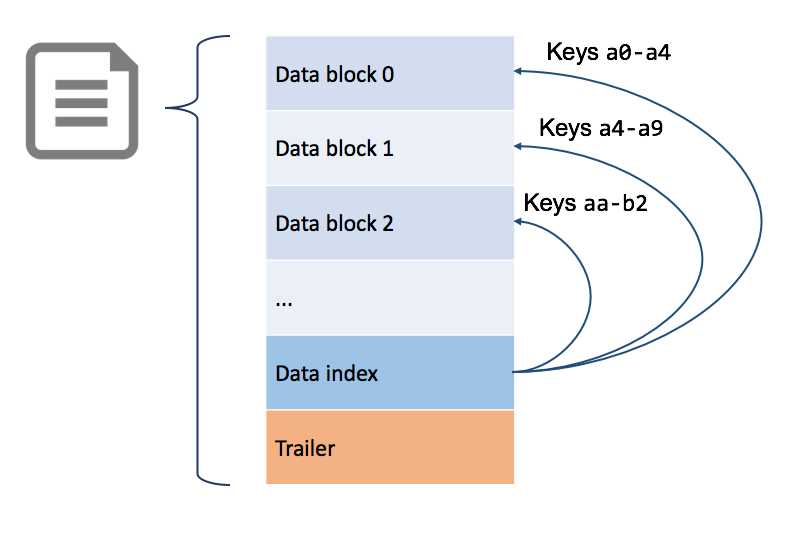
Figure 15: Structure of the HFile
Region Servers keep the HFile indexes for all the regions they serve in memory, so when data does have to be read from disk, the read can be targeted to the specific block that contains the data.
Over time, the data for a region can be fragmented across many sources, which puts additional work on the Region Server and degrades performance—this is called read amplification.
Read Amplification
For a table with intensive read and write access, the data in a region could be scattered across all the data stores in a Region Server. Recently fetched data will be in the BlockCache; recently written data in the MemStore; and old data in the HFile.
The HFile could also be composed of multiple Store Files, and for a single row we could have parts of its data in each of those locations, as in Figure 16, where different columns for the same row are spread across four stores:
A read request for the whole column family for that row will require the Region Server to read from all those stores, and merge the columns for the response.
Having many Store Files for each HFile means a single read request could amplify to many disk reads. In the worst case scenario, when the region is newly-allocated to a Region Server, the files may not be local, which means multiple network calls, and multiple disk reads on a remote server.
You can repair the performance degradation from this situation by running a major compaction manually, which we will cover in the final chapter.
Summary
In this chapter we looked inside the Region Server to see how data is actually stored in HBase, and how the Region Server processes requests to read and write data.
We saw that HBase has a read cache in every Region Server, and a write buffer for every region to improve performance, and a Write Ahead Log to ensure data integrity if a server goes down.
Ultimately, data is stored on disk in HFiles, where one HFile logically contains all the data for one column family in one region of one table. But the buffering pattern means a logical HFile could be split into multiple Store Files on disk, and this can harm read performance.
In the next chapter we'll look at monitoring and administering HBase through the HMaster Web UI and the HBase Shell, including finding and fixing those performance issues.


- 1800+ high-performance UI components.
- Includes popular controls such as Grid, Chart, Scheduler, and more.
- 24x5 unlimited support by developers.