
Apache Solr Succinctly®

CHAPTER 7
SolrConfig.Xml
Configuring Solr
Solrconfig.xml is the main configuration file used to configure Solr’s core. There are multiple sections that include XML statements used to set configuration values for a given collection, parameters which include important features like caching, event listeners, request handlers, request dispatchers, highlighter plugin configuration, data directory location, and items available in the admin UI section.
Request Handlers
One particularly important feature that can be configured is the request handler. A request handler is in charge of accepting an HTTP request, performing the search, and then returning the results back to the calling client.
Request handlers are specified using a QT parameter, and they define logic executed for any request passed to them.
You can, for example, include filters or facets. You can also make the changes in two modes. One way is to append, which adds them to the request without the user asking for them, or you can add an invariant. In this case, if you select invariant, it will be added to the request, and the user cannot modify it. Invariants are very useful for scoping or even for security.
Multiple request handlers can be specified in the same Solrconfig, and you have named request handlers covering multiple Solr cores.
There are three types of query parameters in a request handler:
- Defaults: Provides default parameter values that will be used if a value specified at request time.
- Appends: Provides parameter values that will be used in addition to any values specified at request time or as defaults.
- Invariants: Provides parameter values that will be used in spite of any values provided at request time. It is a way of letting Solr lock down options available to Solr clients. Any parameters values specified here are used regardless of what values may be specified in either the query, the defaults, or the appends parameters.
The default request handler in a Solr installation is /select, which should by now be very familiar to you, as this is the one we've been using for each example so far in this book.

- Default Request Handler as seen in the Admin UI
If you open your Solrconfig.Xml file and look for the handler, you will see that it basically has three defaults, the echoParams, rows, and df parameters. As previously mentioned, a requestHandler can have multiple other parameters defined to control how a query is handled via appends or invariants.
If I uncomment the included sample sections of the /select request handler, we should see something that looks like the following:
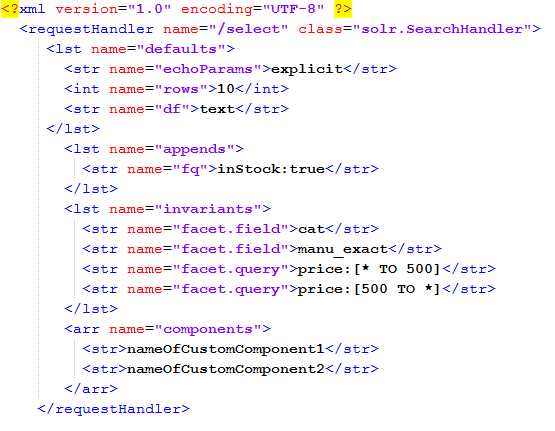
- /select request handler
As you can see, this example is explicitly stating that any result to be returned has to be in stock. This is done by adding the filter query instock:true. Don't make these uncommenting changes yourself just yet; we’re going to build our own handler in just a moment.
Creating a New Request Handler
Let’s create a new request handler that only returns books for one specific author. This might not be a very realistic scenario, but it'll allow me to demonstrate how a handler works.
First, let’s make sure that the handler does not exist. It's good practice to always perform this step just to make sure you haven't already defined a handler with that name. Pass the following URL to your Solr install using your browser:
http://localhost:8983/solr/succinctlybooks/books?q=*%3A*&wt=json&indent=true |
The following figure shows that you should receive a 404 error from that request; this is to be expected, and indicates that you are in fact safe to add the new handler.
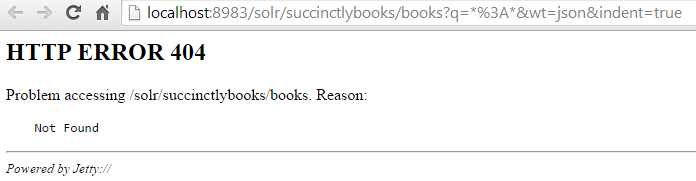
- 404 error returned by Solr to show that the 'books' handler does not yet exist
Now open your Solrconfig.Xml located in your solr/succinctlybooks/conf folder. Please look for the /select request handler, copy it, and remove all commented out lines. Don’t make any changes just yet. It should look something like this:
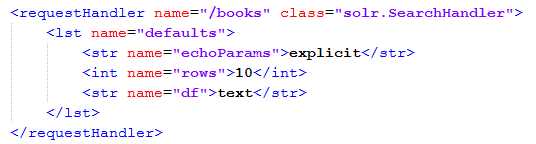
- Our new books handler
The next step is to navigate to the Core Admin and click Reload. By default, collection1 will be selected; please make sure you select succinctlybooks. Don’t navigate away just yet—keep looking at the Reload button. It needs to turn green for a few seconds to indicate that reload was successful.
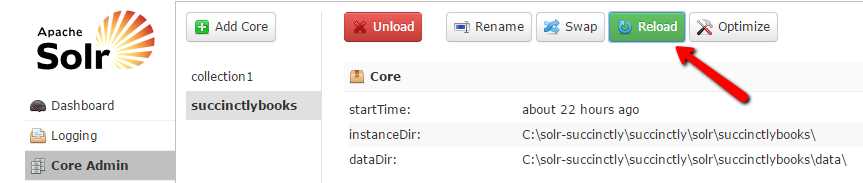
- Reload Cores
Run the query again, but make sure you are using /books instead of the /select request handler, as shown in red:
http://localhost:8983/solr/succinctlybooks/books?q=*%3A*&wt=json&indent=true |
This time, it will most definitely work, and you have 53 results—the same 53 results. Let’s make a couple of changes, starting with a very simple one.
Changing Rows in Request Handler
The number of results that you return to your users depends greatly on how you display your results. Some people do five results, others 10—I’ve seen applications that display 50. While this is different depending on the use case, setting it is easily done as follows.
Within Solrconfig.Xml, navigate to the /books request handler and change the rows parameter from 10 to 5. Reload the succinctlybooks core and re-execute a *:* query.
Tip: Every time you make a change to Solrconfig.xml it is required that you reload the core.
If we run the query before and after, we'll see that before we got 10 results, and afterwards we only get five:
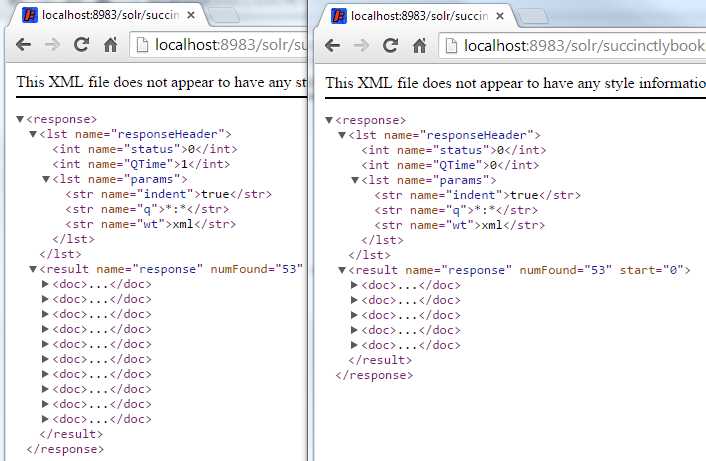
- Compare change rows books handler
Ok, so this one was pretty easy. Let’s do another one.
Appends in Request Handlers
The /books request handler returns all 53 documents—the 50 Succinctly series entries originally added, and the ones we added in the indexing chapter. Let's make a small change using an append so that all queries executed only return books that have my name as the author.
To do this, add an appends section where you specify a filter query for author:"Xavier Morera". It should look something like Figure 111, showing the addition of an 'lst' tag with a name of 'appends' and an inner string tag with a name of 'fq' specifying the filter.
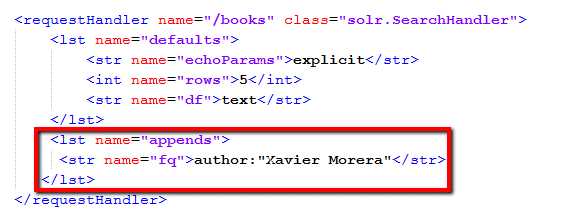
- /books handler appends section
Reload the core, and then run a query for all documents. You will get only three results.
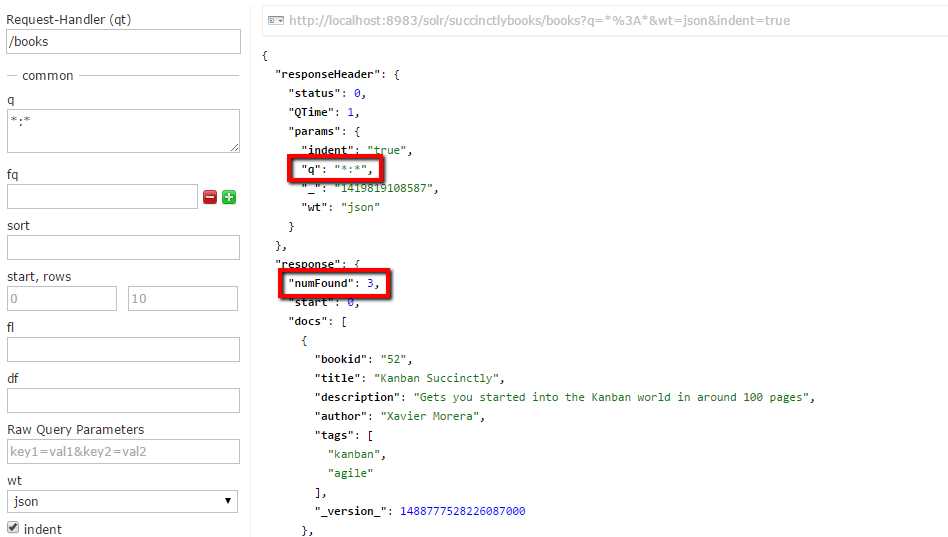
- Results with books handler appends
If you want a more specific query, try q= description:you. In this specific query, if you use /select, you will get two results. One of them is my book, and the other a book is by Cody Lindley.
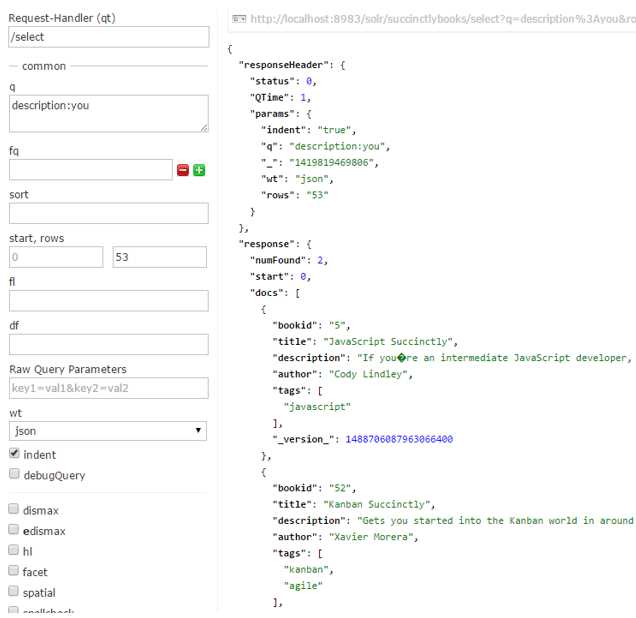
- Query results when the '/select' handler is used
If you do the same using our '/books' handler, however, you should only get one result.
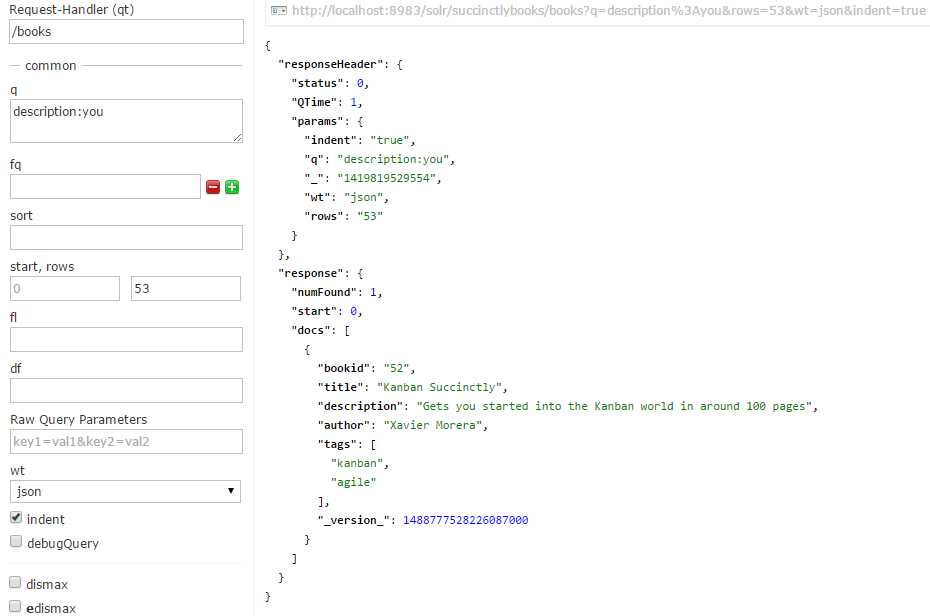
- Query results when the '/books' handler is used
Response Fields
Another aspect that you might want to control is which fields are returned in your response for your particular request handler. This is particularly useful when you have a large number of fields. In one of my recent projects, we had about 200 fields per document, of which only about nine are required to be returned on each query for displaying results. So why return them all?
Selecting which fields should be returned is very easy. Basically, within defaults, just add one fl entry and enumerate which fields you want returned.
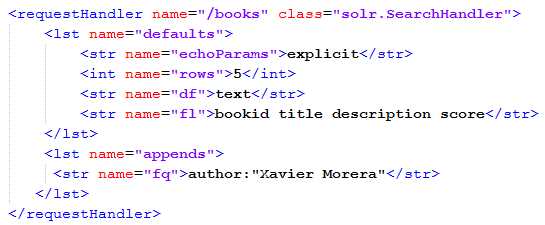
- Response fields
Now let’s test. First, run a query so you have a baseline. Next, reload the core. Finally, in a separate window, run the same query again. The difference should be clearly visible.
First:
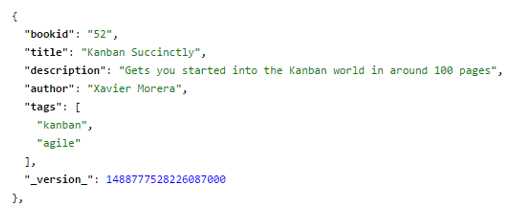
- First query, no score
After reloading:
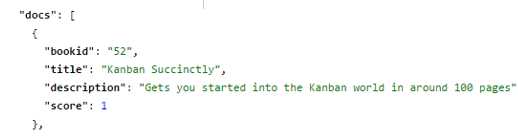
- Query with score
Facets
Our final small modification will be to return facets. If you recall from previous chapters, Faceting is the arrangement of search results into categories based on indexed terms along with counts that indicate the occurrence of each term. It makes it easier for users to drill down into complex result sets and categorize the information better.
Facet.query is an arbitrary query used to generate a facet count. The facet.field is used to specify to Solr which field to be treated as a facet. The prefix indicates that only terms that begin with this prefix can be used as a facet.
Let’s modify our /books request handler within Solrconfig.xml to return facets, and in the process, we will also remove the filter query for author so that we get the entire result set. The steps are simple:
- Comment out the appends section.
- Add an invariants with facet=true to enable faceting, and then specify two different facets, authors and tags. The following XML code should be added to your config:
<lst name="invariants"> <str name="facet">true</str> <str name="facet.field">author</str> <str name="facet.field">tags</str> </lst> |
Your request handler should look like this:
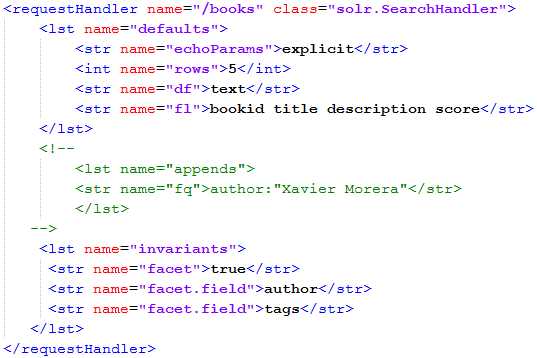
- Request handler with facets
Reload the core and run a query for all records with all default values, and scroll down within the response. Here is what you should be looking at:
- The facet_counts section includes the resulting facets. In our case, we requested two facet fields, author and tags. As you can see, they are ordered from highest number of occurrences to lowest. Way to go Ryan with 6. My friend Peter has three books at the time of writing, but my sources tell me he will be tied with Ryan pretty soon!
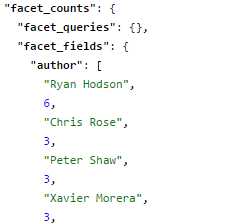
- Author facet
- Further down, we can see the tags, which by the way, I made up for this exercise. They could be refined further for more realistic results.

- Tags facet
- Finally, we did not include any facet queries, facet dates, facet ranges, or facet intervals.
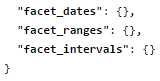
- Facets we did not include
You can specify also on multi-valued fields, like tags, and you can also use facet.mincount to avoid showing all values below a certain number of hits.
Grouping is also possible with facets. In this case we do not have the number of pages per Succinctly series e-book, but if we did, we could dynamically create a range by using the following facets:
- facet.range=rangepageslong: Our range.
- f.pageslong.facet.range.start=0: The beginning of the range.
- f.pageslong.facet.range.end=200: Where I specify the top value of 200.
- f.pageslong.facet.range=20: The gap size.
Solr will generate facets with grouped values on the fly!
Your turn: why not give it a shot on your own? Add a column on page size, add the field, reload the core index, and try this exercise!
As mentioned in previous chapters, the admin UI only includes a very small subset of fields. If you want to use the full power of faceting, you need to use the raw query parameters.
Faceting and other operations that need full use of all the fields are generally run from a third-party application, especially ones created to allow administration of the service. Remember though: facets are extremely powerful and useful, and you should attempt to learn all the possible parameters and fields you can, even if just to allow the use of facets.
Solrconfig.Xml Common mistakes and pitfalls
With great power comes great responsibility, and unfortunately, with Solr's config file, you can also do a lot of harm. I've listed some tips for avoiding the common mistakes and pitfalls newcomers make when configuring Solr. Avoiding them will make your search life easier.
- Focus on minimalism. For example, in a schema.xml when you included things that you don't need, the same applies here: only include those things that you need or are planning to use in the near future. Remember: YAGNI (you aren’t gonna need it).
- Don’t forget caching. Caching is a great tool to increase performance—especially under heavy loads—but it's not always appropriate.
- Avoid overwarming. When Solr starts, you may define some common warming queries. Don't define too many—the more you define, the longer startup takes.
- Don’t define too many handlers. You can define too many handlers for each specific scenario, which may over-complicate your deployment, and will make maintenance an absolute nightmare.
- Remember to review the default configuration. The out-of-the-box configuration is not always exactly the best thing for production, so remember to review it before deployment.
- Make sure you upgrade. Solr moves at an incredible pace, so try to keep it up to date, or you might be missing out on some important or interesting features.
Summary
In this section we learned how Solrconfig.xml is the file used to configure Solr’s core. We learned how to create a request handler, and then to configure it using appends. Some of the possible configurations involved specifying facets, returned rows, and response fields.
We also learned that every time a change is made in Solrconfig.xml, the core needs to be reloaded from the Admin UI.
Now it’s time to learn about searching and relevancy with Solr.


- 1800+ high-performance UI components.
- Includes popular controls such as Grid, Chart, Scheduler, and more.
- 24x5 unlimited support by developers.